
[Notice] [2026 SPRING SEMESTER] REGISTRATION(PAYMENT)
- 장은지
- 2026-02-10
- 281
[2026 SPRING SEMESTER] REGISTRATION(PAYMENT)
*When making a payment via an overseas bank account, please ensure that the exact payment amount is transferred. Payment may fail if the transferred amount differs due to bank fees. Please enter and remit the exact amount indicated.
The Payment After Move-In option is only available for freshmen and exchange students.
Current enrolled students are not eligible for this option.
*This period is the regular dormitory payment period. Students who selected the Payment After Move-In option must complete their payment between March 5 and March 12.
Applicants for Payment After Move-In can view the invoice during the Payment After Move-In period. It is normal that the invoice cannot be viewed during the regular payment period.
*해외 계좌를 통해 기숙사비를 납부할 경우 정확한 금액을 입력해주시기 바랍니다. 수수료 등의 이유로 금액이 달라질 경우 납부가 불가능합니다.
입사후납부는 신입생과 교환학생만 가능합니다. 재학생은 입사 후 납부 불가능합니다.
*본 납부는 정규 납부 기간입니다. 입사 후 납부(Payment After Move-In)를 신청한 학생은 3월 5일부터 12일 사이에 납부하셔야 합니다. 입사후납부 신청자는 입사후납부기간에 고지서 조회 가능합니다. 정규납부기간에 조회 불가능한것은 정상입니다.
1. Registration period (등록기간): February 12, 2026
3rd-round successful applicants must complete the payment within the designated period.
2. Dormitory fee (기숙사비)
SPRING semester 2026 Building & Type | Dormitory Fee | |
Namje Hall | Double room | ₩853,000 |
Quad room | ₩762,000 | |
Hwahong Hall | Double room | ₩1,258,000 |
Quad room | ₩853,000 | |
International Building | Double room | ₩1,644,000 |
3) How to print a bill
⭐The bill can be viewed only during the designated payment period.
Route (경로):
1. For enrolled students (재학생):
Step 1. Access to Ajou portal https://mportal.ajou.ac.kr/main.do > Login > Change Language
Step 2. (New) Application Affairs Information (학사서비스)
Step 3. Application for Student living (학생생활신청)
Step 4. Dormitory Application (입사신청)
Step 5. Application Status > Print Bill (고지서출력)
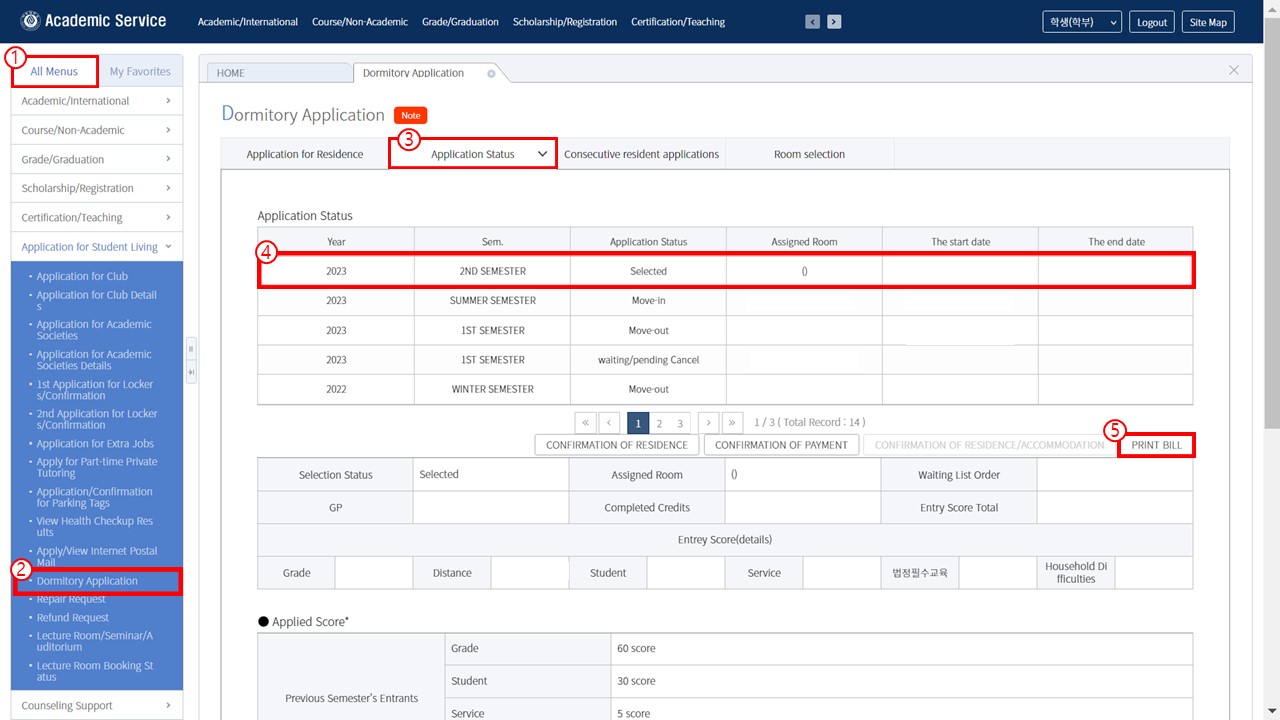
2. For freshman and exchange students (신입생, 교환학생):
1) Log in at the online housing application system web page: https://ajou.ac.kr/edorm/index.do
2) After log in to the above website, please select the relevant option in blue box on center left of the homepage. And then, please go to “Application status > Print Bill” (Access the website you used when you applied for the dormitory)
*If you are unable to print the bill, please try using the “For Enrolled Students” section.
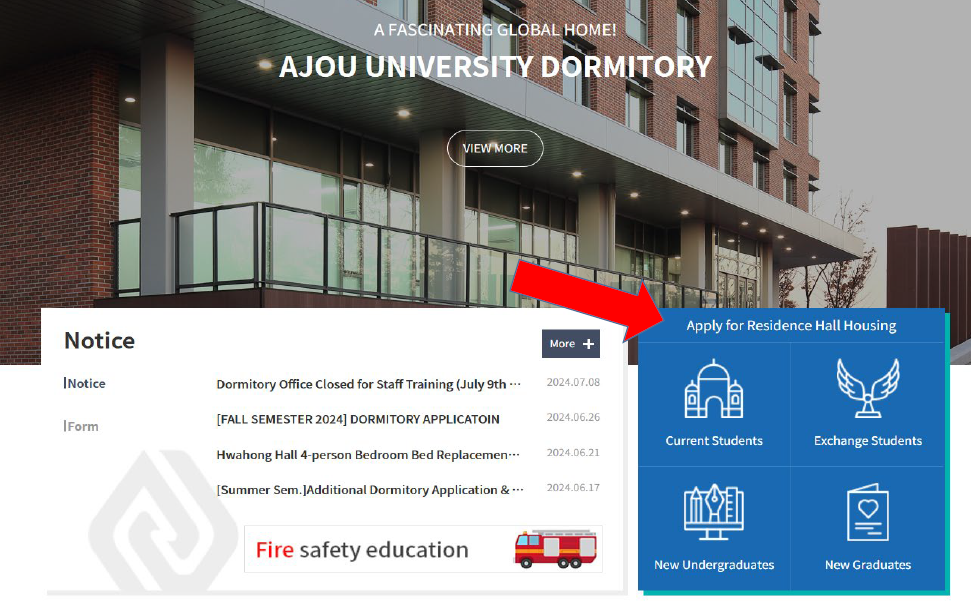
3) CIE Students for Korean Programs in Ajou university (국제교육센터 어학과정 학생)
Please contact the CIE office (located at #B101 Campus Plaza) 국제교육센터 사무실 방문(캠퍼스프라자 B101호)
담당자 연락처 : 031-219-3599 / TRAN, THI MINH TRANG / 짠티밍짱
4. NOTE (주의사항):
1) Your room number will be written on the bill.
2) If you do not pay the dorm fee, your application will be cancelled without further notice. It is not applicable to the students with being granted of dormitory fee.
3) You can print out the bill/invoice during the registration period ONLY from the Ajou portal and webpage you used during the application periods. Virtual account number will be given to each student. (Bank name: Kookmin bank)
4) You can transfer dorm fee from 01:00 am ~ 17:00 pm (Korean time) to the virtual account during the registration periods.
5) Most of foreign students may remit the dormitory fee online. Due to the processing time, it may lead to the payment delay, we encourage you to make a payment in the beginning of the payment period.
6) When you transmit the dormitory fee by using a virtual account number, the dormitory fee you transmitted in foreign currency must be exactly same as the dormitory fee in KRW. If not, the payment will not be processed successfully.
7) If the virtual account is not working, please send me e-mail. (eunji@ajou.ac.kr)
8) Before making the payment, please double check whether you are going to stay in the Ajou dormitory. We do not give a refund to the bank account overseas.
1) 호실번호는 기숙사비 청구서에 적혀 있습니다.
2) 등록기간 내에 기숙사비를 납부하지 않을 경우, 별도 통보 없이 기숙사 선발이 취소됩니다. (장학생 예외)
3) 등록기간동안에만 아주대학교 포털 또는 기숙사 신청 사이트에서 청구서를 출력할 수 있습니다. 가상계좌번호가 각 학생들에게 부여될 것입니다.(은행명: 국민은행)
4) 한국 시간으로 새벽 1시에서 오후 5시까지 가상계좌로 송금할 수 있습니다.
5) 대부분의 학생들이 온라인 송금을 할 것입니다. 온라인 송금 처리가 지연될 수 있으니 등록 기간 초반에 송금하시기 바랍니다.
6) 가상계좌로 송금할 경우 송금하는 외화와 원화의 금액이 정확히 일치해야 송금할 수 있습니다.
7) 만약 가상계좌 송금이 되지 않을 경우, 생활관 외국인 코디네이터에게 연락 주세요.(eunji@ajou.ac.kr)
8) 생활관은 해외 계좌로 환불해드리지 않기 때문에, 기숙사에 확실히 거주할 경우에만 송금을 진행하시기 바랍니다.