
[Notice] [2026 FALL SEMESTER] 1ROUND_REGISTRATION(PAYMENT)
- 2026-06-30
- 255
Changes to Dormitory Fee Payment Methods & Invoice Guide
Hello, this is the Dormitory Office.
Starting this semester, the payment methods for dormitory fees have changed to the following two options. Please review the details below and complete your payment within the designated period.
1. Registration period (등록기간): August 4 – August 6, 2026 (01:00~17:00)
Both 1st- and 2nd-round successful applicants must complete the payment within the designated period.
2. Dormitory fee (기숙사비)
FALL semester 2026 Building & Type | Dormitory Fee | |
Namje Hall | Double room | ₩853,000 |
Quad room | ₩762,000 | |
Hwahong Hall | Double room | ₩1,258,000 |
Quad room | ₩853,000 | |
International Dormitory | Double room | ₩1,644,000 |
3. How to print a bill
⭐The bill can be viewed only during the designated payment period.
✅ Route (경로):
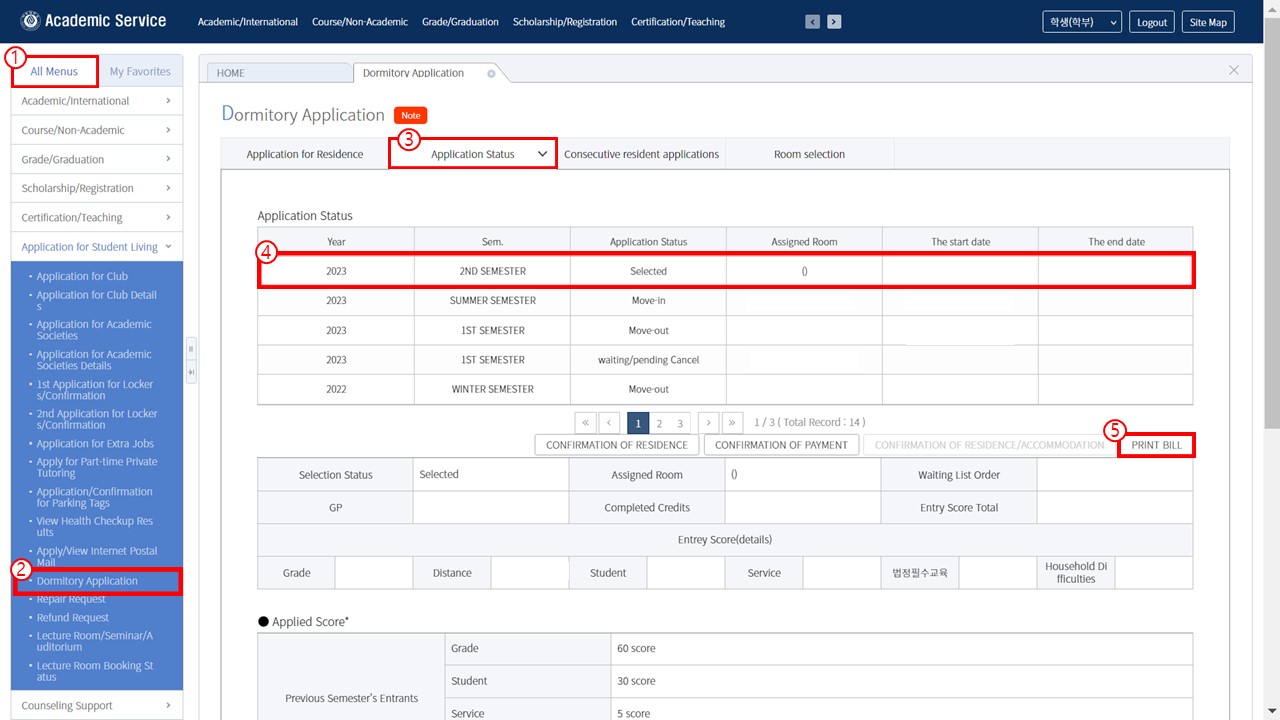
1. For enrolled students (재학생):
Step 1. Access to Ajou portal https://mportal.ajou.ac.kr/main.do > Login > Change Language
Step 2. (New) Application Affairs Information (학사서비스)
Step 3. Application for Student living (학생생활신청)
Step 4. Dormitory Application (입사신청)
Step 5. Application Status > Print Bill (고지서출력)
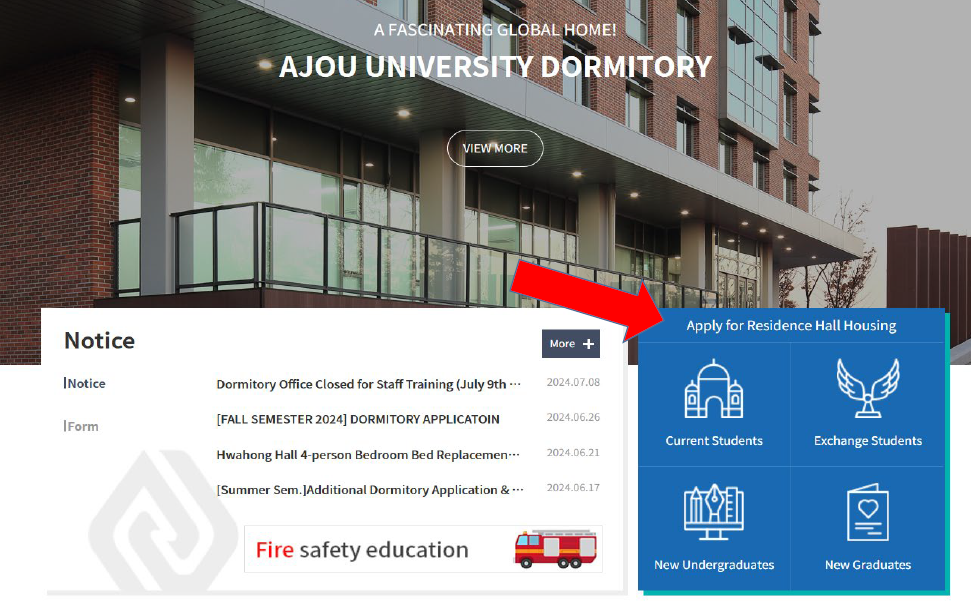
2. For freshman and exchange students (신입생, 교환학생):
1) Log in at the online housing application system web page: https://ajou.ac.kr/edorm/index.do
2) After log in to the above website, please select the relevant option in blue box on center left of the homepage. And then, please go to “Application status > Print Bill” (Access the website you used when you applied for the dormitory)
*If you are unable to print the bill, please try using the “For Enrolled Students” section.
3) CIE Students for Korean Programs in Ajou university (국제교육센터 어학과정 학생)
Please contact the CIE office (located at #B101 Campus Plaza) 국제교육센터 사무실 방문(캠퍼스프라자 B101호)
담당자 연락처 : 031-219-3599 / TRAN, THI MINH TRANG / 짠티밍짱
■ Payment Options (Choose One)
Option 1: Payment via Korean Bank Account or Cash
- Mobile/Online Banking: Transfer the fee to your personalized virtual account number listed on the invoice.
- Bank Window: Print out the invoice and visit a local Korean bank to pay in cash.
Option 2: Payment via International Account or Card (via FLYWIRE)
You can pay using your home country's bank account or credit card through FLYWIRE, a global payment platform. (Please note that transaction fees may vary depending on the payment option you choose.)
■ ⚠️ CRITICAL NOTE: Regarding Invoices & Account Numbers
The Dormitory Office will send ONLY the [FLYWIRE Invoice] to your email.
- If you pay via Korean Bank Transfer (Mobile Banking, etc.): You can simply transfer the money to the virtual account number written on the FLYWIRE invoice we emailed you. (The virtual account number on the FLYWIRE invoice is exactly the same as the one on the school portal.)
- If you pay in CASH at a Korean Bank Window: Banks require the official school format. Therefore, you must log into the school portal system and print out the [Dormitory Invoice] yourself before visiting the bank.
⭐Summary: The virtual account number is identical across all invoices. You may choose whichever payment method is more convenient for you. However, if you plan to pay in cash at a bank counter, you MUST print the invoice from the school portal.
■ 납부 방법 (택 1)
1. 한국 계좌 이체 또는 은행 방문(현금) 납부
- 모바일/인터넷 뱅킹: 고지서에 기재된 본인의 가상계좌로 이체합니다.
- 은행 창구 납부: 고지서를 출력하여 현금과 함께 은행에 방문 후 납부합니다.
2. 해외 계좌 또는 해외 카드 납부 (FLYWIRE 이용)
글로벌 결제 플랫폼인 FLYWIRE를 통해 본국에서 사용하던 계좌나 카드로 납부할 수 있습니다. (선택하는 결제 수단에 따라 수수료가 다를 수 있습니다.)
■ ⚠️ 필독: 고지서 수령 및 가상계좌 안내
생활관 운영팀에서는 모든 외국인 학생분들에게 [FLYWIRE 고지서]만 이메일로 발송해 드립니다.
- 한국 계좌로 송금(모바일 뱅킹 등): 이메일로 받은 FLYWIRE 고지서에 적힌 가상계좌번호로 바로 송금하시면 됩니다. (학교 포탈 고지서와 가상계좌번호가 동일합니다.)
- 은행 창구에서 현금으로 납부: 은행 제출용 양식이 필요하므로, 학교 포탈 시스템에 직접 로그인하여 [생활관 고지서]를 출력하신 후 은행에 가져가셔야 합니다.
⭐요약: 어떤 방법을 선택하시든 가상계좌번호는 동일하므로 편한 방법으로 납부하시면 됩니다. 단, 은행 창구 현금 납부자는 포탈에서 고지서를 직접 출력해 주세요!